Category: Social Media/Digital Marketing

Great Facebook Apps for Business

Great article in this month’s issue of Website Magazine, Making the Case for Facebook by Matt Goulart, Founder and Lead Consultant with Webstar Content. In this article, Matt states, “With the decline of traditional television and print advertising, it is getting harder and harder to find effective ways to attract consumer attention. Increasingly, many businesses are moving toward online and social networking tools. Facebook can be a highly effective cost-free solution.”

So, why Facebook? Well, as many are aware, Facebook is the world’s largest social network!

Seven Great Facebook Apps for Business
From the Staff at Website Magazine

Contests – Businesses can create and launch branded contests on Facebook Fan Pages within minutes. Available formats include photo contests, video contests, design contests, logo contests, essay-based contests and more. Contests are a great way to build brand awareness, build content on Fan Pages and recruit new fans.

SocialToo – Enables users to update their personal profile pages, any Facebook Fan page they administer and even remotely to Twitter from the convenience of the status update box.

SocialOomph – Provides productivity tools for social media users and includes tools for Twitter, StatusNet, and Facebook. Facebook users can schedule status updates for their accounts to be published at dates and times of their choosing.

NetworkedBlogs – Promote your blog on Facebook and discover new blogs. NetworkedBlogs is a community of bloggers and blog lovers. Join the fun, add your blog, and connect with others who read and write about subjects you like, as well as promote your blog to active social media users.

RatePoint – Lets users create e-mail newsletters, collect reviews and testimonials and build surveys for free. Connects to Facebook and Twitter easily and allows for share reviews and newsletters with Facebook Friends and Fans, and Twitter followers.

Jobmagic – A social media recruiting application that expands a recruiter’s reach by leveraging Facebook, LinkedIn and Twitter social media channels to help start a dialogue with other candidates which other recruiters cannot.

Social Store Builder
– Enables a Volusion store owner to display and sell products directly on their Facebook page. After clicking on a featured product, the customer is taken to the store owner’s secure, one-page checkout to complete the transaction.

Bookmark and Share

Social Media Enhances Email Marketing

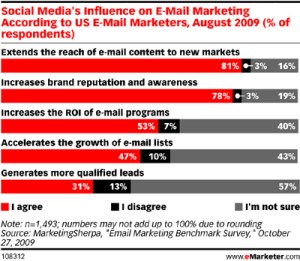
In 2009, e-mail marketers started to get social, but 2010 will be the year social media makes e-mail marketing more powerful, according to eMarketer.

Social media is a partner, not a threat, to e-mail marketing because it provides new avenues for sharing and engaging customers and prospects.

Even though people are spending more time using social media, they are not abandoning e-mail. The two channels can help each other, offering the opportunity for marketers to create deeper connections.

Source: Adweek


Bookmark and Share

Yikes! Help or Yelp for Customer Service Issues?

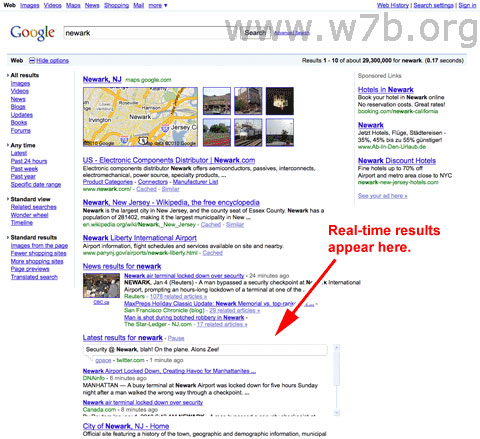
In working with franchise clients on integrated franchise marketing strategies, including social media, a large part of our effort is directed towards improving Search Engine Optimization (SEO). Google Real-time Search Results play a big role in this and as we know, these results are based upon social media activity and content.

Another aspect of SEO that goes hand-in-hand with search rankings is Local Business Listings Management which basically addresses local search results through a plethora of sites, including many customer review sites such as Yelp! But, what to do about negative customer reviews is always on our minds when they push their way towards the top of the search results. Especially, if the negative review is unwarranted. Or, if the negative review was legitimate, but the issue resolved. Should a negative mark be left out in the open for all the world to see? What are the potential repercussions if the comment is posted and tweeted throughout social media channels and we know this activity will be picked up in Goggle’s Real-Time Search Results. Potentially, this becomes a Circle of Life that we want to avoid. But, at what cost? Yikes!

Well, as the old Fram Oil Filter commercial states, “You can pay me now, or pay me later.” Translation for the franchise community: Dedicate some resources towards improving customer service practices now, or pay to try to remove the negative comments online later, which is not easy to do for a variety of reasons. Some of which may not be the most ethical as the customer review sites feel they have control of your destiny, and want you to pay dearly to relinquish the control back to you. Yikes, for sure!

The following post about one of the more popular review sites, Yelp! and such practices, was written by franchisEssentials Guest Author, Megan Erickson of the Dickinson Law Firm. As you may know, Megan is the author behind the recently launched Social Networking Law Blog. Previously, we posted an article by Megan that proved very popular in franchise circles, Employer Social Networking Policies.

Yelp! Faces Federal Class Action Lawsuit

Bad online review? Interested in buying your way out of it?

Yelp is a popular interactive website allowing its users to create and access reviews of local businesses and services.  The site now faces serious accusations of unfair business practices.

After Yelp! received some bad press for what many believe to be shady advertising practices, a class action lawsuit was filed yesterday in a California federal court. According to a press release posted on the Yelp Class Action Website:

“The lawsuit alleges that Yelp runs an extortion scheme in which the company’s employees call businesses demanding monthly payments, in the guise of ‘advertising contracts,’ in exchange for removing or modifying negative reviews appearing on the website.”

I first learned of the lawsuit via this post by Bradford Schmidt.


Bookmark and Share

Social Media, Web 2.0 and Internet Stats: Astonishing, to say the least!

The following social media, Web 2.0 and internet statistics were recently posted on The Future Buzz.

Google search stats:

1,000,000,000,000 (one trillion) – approximate number of unique URLs in Google’s index (source)

2,000,000,000 (two billion) – very rough number of Google searches daily (source)

$110,000,000 – approximately amount of money lost by Google annually due to the “I’m Feeling Lucky” button (source)

24,400 – number of people employed by Google (December, 2008)

68,000,000 – the average number of times people Googled the word Google each month for the last year (source:  keyword tool)

$39.96 – the average cost per click for the phrase “consolidation of school loans” in AdWords (source:  keyword tool)

1,430,000 – the number of Google results for “Robert Scoble”

136,000 – the number of Google results for “Admiral Ackbar”

Wikipedia stats

2,695,205 – the number of articles in English on Wikipedia

684,000,000 – the number of visitors to Wikipedia in the last year

75,000 – the number of active contributors to Wikipedia

10,000,000 – the number of total articles in Wikipedia in all languages

260 – the number of languages articles have been written in on Wikipedia

(source)

YouTube stats

70,000,000 – number of total videos on YouTube  (March 2008)

200,000 – number of video publishers on YouTube (March 2008)

100,000,000 – number of YouTube videos viewed per day (this stat from 2006 is the most recent I could locate)

112,486,327 – number of views the most viewed video on YouTube has (January, 2009)

2 minutes 46.17 seconds – average length of video

412.3 years – length in time it would take to view all content on YouTube (March 2008)

26.57 – average age of uploader

13 hours – amount of video are uploaded to YouTube every minute

US $1.65 billion in Google stock – amount Google Inc. announced that it had acquired YouTube for in October 2006

$1,000,000 – YouTube’s estimated bandwidth costs per day

(sources here, here and here)

Blogosphere stats

133,000,000 – number of blogs indexed by Technorati since 2002

346,000,000 – number of people globally who read blogs (comScore March 2008)

900,000 – average number of blog posts in a 24 hour period

1,750,000 – number of RSS subscribers to TechCrunch, the most popular Technology blog (January 2009)

77% – percentage of active Internet users who read blogs

55% – percentage of the blogosphere that drinks more than 2 cups of coffee per day (source)

81 – number of languages represented in the blogosphere

59% – percentage of bloggers who have been blogging for at least 2 years

source

Twitter stats

1,111,991,000 – number of Tweets to date (see an up to the minute count here)

3,000,000 – number of Tweets/day(March 2008) (from TechCrunch)

165,414 – number of followers of the most popular Twitter user (@BarackObama) – but he’s not active

86,078 – number of followers of the most active Twitter user (@kevinrose)

63% – percentage of Twitter users that are male (from Time)

Facebook stats

200,000,000 – number of active users

100,000,000 – number of users who log on to Facebook at least once each day

170 – number of countries/territories that use Facebook

35 – number of different languages used on Facebook

2,600,000,000 – number of minutes global users in aggregate spend on Facebook daily

100 – number of friends the average user has

700,000,000 – number of photos added to Facebook monthly

52,000 – number of applications currently available on Facebook

140 – number of new applications added per day

source

Digg stats

236,000,000 – number of visitors attracted annually by 2008 (according to a Compete survey)

56% – percentage of Digg’s frontpage content allegedly controlled by top 100 users

124,340 – number of stories MrBabyMan, the number one user, has Dugg (see updated number here)

612 – number of stories from Cracked.com that have made page 1 of Digg (see all 41 pages of them here)

36,925 – number of Diggs the most popular story in the last 365 days has received (see story here)

Even more web 2.0, social media and internet stats, facts, figures and numbers:

Blogging Stats, Facts And Data:  2009 Blog Statistics By The Numbers

Future Marketing Trends:  By The Numbers

Internet Marketing Tactics – What’s Hot And What’s Not


Bookmark and Share

Males vs Females in Social Media: A Change in Tide?

The following was posted on the Online Media Gazette site about a recent survey that indicates the tide is changing when it come to social media usage by men and women. I found the most interesting fact is that women are still ahead in embracing and using the more mainstream social media such as Facebook and Twitter whereas the men seem to be more interested in the lesser-known, and possibly more complicated social media such as Slashdot which boasts itself as, “News for Nerds. Stuff that Matters.”

According to Liberty Mutual’s latest survey, they found that men embrace and use social networking sites much more than women do. Men are more active in social media “across the board” according to the survey.

The national survey was part of the firm’s Responsibility Project where they hope to give an insight to what people think are responsible ways to use social networking technologies at work, school and in relationships.

The results showed that 57% of men are more likely than 50% of women to have more than one social networking account on websites such as Facebook and Twitter. On top of that, 51% of men find it reasonable for their boss to tweet about their company compared to 37% of women.

The results are so much different from Pingdom’s survey done on November 2009. Before that, the ratio between male and female demographics in social networks was 47% and 53% respectively. Here’s a chart from the site to review the past statistics. (Make note: the chart is of PAST statistics, not of the current survey. Go figure…)


Bookmark and Share

Are You Getting Positive Bottom Line Results From Your Social Media Efforts?

Social media has definitely gone mainstream and many franchise organizations have embraced it for a variety of reasons. Some are utilizing it to create or improve brand awareness. Others are using it to drive business to franchise locations and/or to create interest in their franchise opportunity. And many have embraced it just because they believe they must, or feel they may miss the proverbial boat.

In any event, there are questions that franchise executives should be realistic about in answering as they continue their social media efforts and work towards effectively integrating the same with traditional marketing.

* What are the objectives for using social media within our franchise system?
* Has a comprehensive social media strategy been developed consistent with our goals?
* Are our social media efforts integrated with our overall marketing strategy?
* Are our social media efforts specifically targeted for optimum effectiveness?
* Are we effective in our social media efforts?
* What are our bottom line results?

Although all six questions listed above are important in evaluating your social media strategy and efforts, the last two questions may be the most important. Truly knowing and understanding the level of effectiveness of your social media efforts, and it’s affect on your bottom line, is essential to achieving your franchise marketing and development goals and objectives.

That’s where franchisEssentials can help!

FREE Social Media Assessment ($1200 Value)

franchisEssentials FREE Social Media Assessment has been designed exclusively for franchise organizations. Basically, the assessment is a 48-step Social Media Checkup that evaluates primary and secondary elements of social media efforts, explores franchise-related issues within social media messages, identifies specific opportunities per established and defined goals and objectives, establishes a baseline for quantifying and analyzing social media metrics, and provides a grade for each specific social media component being utilized as well as for the entire social media program.

Upon completion of the FREE Social Media Assessment, a debriefing session is scheduled to explain the results of our findings in full, concise detail and to provide best-practice recommendations for improvement in specific social media efforts, and for the social media program itself. Including the preliminary meeting which typically takes approximately 30-45 minutes, the actual assessment and evaluation, and the debriefing session which takes 45-75 minutes, the total process should be completed within four days.

Ask yourself the questions listed above, and unless your answers are honest and provide you will full satisfaction in your current social media efforts, we strongly suggest you take full advantage of franchisEssentials FREE Social Media Assessment. It really does make good business sense to do so!

Start Now!

To schedule a preliminary meeting, and/or to learn more about this FREE service or any of our franchise marketing and development services, please contact Paul Segreto by email or by phone at 832.838.4822.


Bookmark and Share

SEO via Social Media

So, how do you optimize your social media so that it helps in the increasingly important objective of being found online as easily as possible?

Recently, at JeffBullas’s blog, the five top social media channels (Facebook, Blogs, YouTube, Twitter and LinkedIn) were targeted for search engine optimization purposes. Basically, how these five channels help you get noticed and found online. In light of Google’s recent initiative of Real-Time Search Results, social media activity and content are key components in search results. Ultimately, wouldn’t it be great to have all of the top five social media channels, YOUR channels, on the first page of your brand’s search results? Maybe even within the first five of six results sandwiched around your brand’s website? Well, the following, as clearly identified in the aforementioned blog, will help you achieve your SEO goals and objectives.

How To Optimize Your 5 Top Social Media Channels
As originally posted on JeffBullas’s Blog on January 14, 2010

1. Facebook

Facebook has 3 types of ways you can participate, Profile (Personal), Groups (clubs and associations) and Pages (companies and businesses).

The primary goal of having a Facebook “Page” is to get fans (or subscribers) and invoke interaction. The secondary goal is drive them to an offer page or get them to your target website. How do you do get more fans and visibility within Facebook? By pushing content out tactfully. The Wall within a Page is the same as a Wall within a Profile. Therefore Page Admins can publish stories, news, and offers to their Fan’s home page streams. The other internal way to communicate with Fans is by direct messages to their inboxes, which is reportedly being used less and less. Who uses email these days anyway right, right?. Here are some ideas to get you started

– Use a group or page profile for your business rather than personal as they are much more transparent to search engine crawlers
– Choose a vanity URL that contains your keywords (such as facebook.com/widgetwholesales)
– Exclusive offers for Fans only is great Fan bait
– When you post content, always include video or imagery. Facebook users are very visual.
– Publish fresh content at least 2-3 times per week
– Analyze, iterate and optimize using the Facebook Insights Tool to get “high-level demographic and geographic insights about your Fans”, and to “analyze the number of interactions and overall engagement with your Page and posts.”

2. Blog

Blogging demonstrates true commitment and passion to your industry that you really can’t fake long-term. Most won’t be able to sustain it over long periods of time with frequency, but those who do so are rewarded in spades and stand out from the crowd. So here are some tips on optimizing your blog

– Buy ( I know that says get your credit card out) your own domain name not a subdomain or name under typepad or wordpress .. buying a homebase is a lot better than renting one.
– Purchase a theme such as WordPress Thesis theme that can be optimised for SEO such as URL’s and meta descriptions
– Post content regularly (at least once a week) .. Search engines love new unique content
– Promote your Blog on Twitter regularly (Google now has real time search feed into Twitter API)
– Include share buttons to other social media channels on each blog post so visitors can add your blog and posts

3. YouTube

The increasing impact of Social Media “Online Video and its importance to getting found online because of the facts and figures emerging that can’t be ignored… in fact its hard to get your head around them. Comscore announced in August, 2009 that over 25.4 Billion video views ocurred in the USA alone (Yes…. Billions not millions). This is up from 14.3 Billion In December 2008. This is a 78% increase in just 8 months. Google’s sites such as YouTube had a 39% market share with the closest competitor being Microsoft sites with 2.2%. (Google owns YouTube by the way). Here are some tips to get you started

– Create your own YouTube Channel
– In your description section for your video, always put your link to your blog or your website to make it easy for people to link back to your site
– Put the category such as [Social Media Marketing] in Brackets before each Title of your video
– Put “Tags” in your video tags section, make them relevant to your video title, fill up your tag allotment quota allowed and optimize them
– Again promote your YouTube video on Twitter and place them on your blog in a Video or YouTube Channel section

4. Twitter

Twitter became mainstream in during 2009 and has continued to provide ways to connect, communicate and promote your content from your website and blog.

– In the account settings, be sure to add your website’s URL
– Write a great title (approximately 42 characters are factored into each tweet’s title tag, including the account name, as well as the initial characters of each tweet. Keep in mind that your full tweet and all its characters are still being indexed by major engines).
– Place a retweet button on your blog articles and integrate your Twitter URL within your site’s Global Footer, which appears at the bottom of every page of your site. Both of these options offer usability to your site visitors and help drive your Twitter URL up in the search engines.
– Include “Follow me on Twitter” buttons on your emails and blog
– Leave at least 20 characters spare (make your tweet no longer than 120 charcters), so that it allows room for people to – “Retweet” your “Tweet” with comments like “Great post”
– Almost always include a link back to your blog posts in your tweet (don’t waste a Tweet), this is a significant traffic driver for bloggers.

5. LinkedIn

LinkedIn is the world’s largest professional network which started up in 2003 and now has over 55 million members and growing rapidly (It is one of the top 5 social media channels). LinkedIn connects you to your trusted professional contacts and helps you exchange knowledge, ideas, and opportunities with a broader network of professionals. So how do you optimize this platform to enhance you and your companies brand.

– Create a public profile (don’t lock it away) This is an easy way to start building an on-line presence for yourself, since LinkedIn ranks high in the search engines
– Use the questions and answers feature to start conversations, create community, and position yourself as a subject matter expert. By answering questions, you are simultaneously endorsing your candidacy and expertise this can also be used to drive traffic to your blog when you leave your answer or when you place your question.
– In your homepage activate your Twitter and LinkedIn interfaces.
– Activate your blog feed to your homepage on linkedIn (where your last blog posts are displayed). Use the questions and answers feature to start conversations, create community, and position yourself as a subject matter expert. By answering questions, you are simultaneously endorsing your candidacy and expertise
– In your settings (in the edit my profile section) make sure your websites and blogs (you can enter 3) with relevant customised key word descriptions. (mine includes My Company, My blog (jeffbullas.com) and My Facebook “Page” URLs

Be sure to check out the original post on Jeffbullas’s blog as there are additional tips and links that are valuable resources for learning how to effectively utilize these top five social media channels.


Bookmark and Share

The Many Faces of Social Media

Many within business circles, including franchising, initially believe social media is only LinkedIn, Facebook and Twitter and have a difficult time grasping the many other forms of social media that are alive and well. Certainly, very valuable resources when integrated with each other and then integrated with (and within) traditional marketing. The following is an excerpt from Wikipedia.com that includes links to various Wikipedia pages relating to the many different forms of social media.

Social media can take many different forms, including Internet forums, weblogs, social blogs, wikis, podcasts, pictures, video, rating and social bookmarking. Technologies include: blogs, picture-sharing, vlogs, wall-postings, email, instant messaging, music-sharing, crowdsourcing, and voice over IP, to name a few. Many of these social media services can be integrated via social network aggregation platforms like Mybloglog and Plaxo.

Examples of social media software applications include[citation needed]:

Communication
Collaboration
Multimedia
Reviews and opinions
Entertainment
Other


Bookmark and Share

Social Media Marketing Tracking Tools

1) http://BackTweets.com : A search engine for Twitter. See who’s tweeting your links and more. Can also sign up for email alerts of new findings.

2) http://Addictomatic.com : A little different than the others , you type in a keyword, topic or phrase and out it goes searching the top blogs, news sites, Google, Technorati, Ask, YouTube, Flickr, Digg, Topix and more. You’ll be given a personalized results page to bookmark with everything it finds related to your topic.

3) http://Buzzoo.net : All about Internet buzz, it tracks several different websites to bring you what’s “hot” right now.

4) http://Surchur.com : Search for the latest and greatest on topics that are popular right now. Type in a keyphrase and it searches blogs, social news sites, photo and video sites for your chosen topic.

5) http://Commentful.Blogflux.com : This service watches for comments on blog posts, Digg, Flickr, and others and notifies you of any findings.

6) http://AlertRank.com : A better way to organize and sort Google alerts. Get a daily report emailed to you in a spreadsheet format of what it finds.

7) http://BoardTracker.com : A search engine for forums only. Monitor discussion boards and be notified by email when a thread matching your search terms is discovered. Free to use.

8) http://www.google.com/alerts : I’ve been using this “secret weapon” for years. Simply type in your name or company name and receive daily emails of results found. They do the work, you receive the links. Free and nice.

9) http://BrandsEye.com : An online reputation management tool with a real-time, concise overview of your online reputation. Multiple levels of services and pricing available. Starting at $1.00.

10) http://Twazzup.com : Another Twitter only search engine.

11) http://SiteMention.com : Type in your url and find out what’s being said about you. The results returned are gathered from Google Blog Search, Twitter, FriendFeed, YouTube, MySpace, Digg, Delicious and many more.

12) http://Brandwatch.net: This service tracks your brands, companies, even the competition. Sign up for free weekly updates on any brand. Their detailed reports break down what sites like you, your most talked about features, weekly summary of all blogs and forum activity. Very similar to the old “press clipping” service.

13) http://Trackur.com : A tool that scans many websites including blogs, news, image and video sites, forums and notifies you of any mention of your brand, products/services. Easy to use and affordable. Prices vary depending on need, a personal account is only $18.00 a month, corporate account $88.00 a month with other options also available. Try a “personal” account free for 14 days.

14) http://FiltrBox.com : This one searches online news sources, Twitter and others to find out what’s being said about you or your company. Pricing is based on the number of users, but there is a free version that provides “5 filters” and 15 days of what they call “article history”.

15) http://SocialMention.com/alerts : Just like Google Alerts but for social media. Enter your keyword phrase and email address to be notified of any new findings. Searches blogs, microblogs like Twitter, bookmarks, comments, events, images, news, videos and more.

16) http://BlogPulse.com : A search engine that searches only for data posted to blogs. Enter your keyword, hit submit and off it goes to gather results.

17) http://BackType.com : Billing itself as a “conversational search engine” they index millions of conversations from social networks, blogs and other social media.

18) http://sm2.techrigy.com : Industry insiders claim this to be the leading social media monitoring solution online. Choice of free or paid version. Free is limited to five searches and 1,000 results. There are three paid professional levels: Gold, Diamond, or Platinum.

19) http://ReputationDefender.com : This paid service finds out everything there is to know about you online, and if negative information is found they try to have it removed. Different types of plans are available such as “My Reputation”, “My Privacy”, starting at only $14.95 a month.

20) http://Topsy.com : Topsy will track your tweets that have been retweeted so you can find out who’s been sending you all that “link love”. Type in your Twitter user name and you’ll be amazed at what you find.

Originally posted on AddMe.com


Bookmark and Share

Real-Time Search Results: Another Compelling Reason for Franchise Companies to Embrace Social Media

Social Media Blueprint – Making the Most of Social Search (as posted on SmartBrief on Social Media)

If social media was not on your company’s marketing radar three months ago, recent developments in search have most likely changed that. Social media is now intertwined with search like never before, providing a uniquely tangible business case to marketers deliberating on the benefits of social-marketing efforts.

This special report is designed to help you keep up with those changes and learn how others are successfully adapting to cutting-edge technology.

The future of social search with AOL’s Simon Heseltine

Simon Heseltine is the senior marketing manager at AOL. He is responsible for all SEO efforts across AOL’s FanHouse (sports) and News properties. Here’s an abridged version of his conversation with SmartBrief’s Rob Birgfled on the effects social search is having on SEO efforts.

How would you define social search? How does it differ from algorithmic search? What are the benefits of human qualities in search engine input?

The basic difference is that with social search, you’re using humans and human behavior, through tagging, re-tweeting, voting, etc., to assist with the order of the search results. As for whether pure algorithmic search is better than socially adjusted search, look at what Google’s been doing for a while now: For a video to be ranked, they look at views, comments and rankings (among other factors). That is socially adjusted search.

What has happened over the last six months that changes the search equation? What should businesses do to keep pace?

In December, you started to see real-time news streams and Twitter streams for breaking news stories showing up in the search results. In my opinion, they can be a bit distracting, but if they’re improving click-through rates, they’re going to stay, and if they’re not, the search engine will move them out for the next big idea to be trialed.

Where is search going, in your opinion? Given these developments, is search becoming more important to businesses?

I had the pleasure of moderating the “Future of Search” panel at SES Chicago, and what I got from that panel is that there’s a lot of opportunity in mobile, especially with all of the functionality that’s available in today’s smartphones (I just upgraded to a Droid last week, and I’m quite frankly amazed at what can now be done, and the possibilities). I think there’s also going to be a lot more integration of social factors within search, so if your business isn’t looking beyond the “10 blue links,” you should, because your customers are.

Read the full interview on SmartBlog on Social Media.

Recent poll results regarding real-time search results and social media activity…

Now that search engines are including real-time results from Twitter, Facebook, etc., are you paying more attention to what you are sharing/saying?

Not at all. 37.97%
Definitely. 29.11%
Does it even matter? 16.88%
Taking a little more time. 16.03%

Has the integration of social media into traditional search changed your online-marketing strategy in the past six months?

Yes. 44.22%
Still trying to figure out what the changes mean. 27.21%
No. 24.49%
What’s social search? 4.08%